 opaya
opayaHermes Agent Setup: From Install to First Real Workflow
A working agent on day one.

This Hermes agent setup guide covers the full sequence: installing Hermes, configuring a model provider, connecting one channel, deciding where memory and skills live, running a first complete workflow, and putting logs, backups, and updates on a routine. A Hermes agent that answers one question is a demo; one that runs for months on a laptop or a small server, remembers what matters, and completes a real workflow every weekday morning is an engineering problem—and most of that difference lives in the setup. Treat the steps below as an order of operations. Treat the official Hermes Agent documentation as the source of truth for current command names, flags, and configuration keys, which change faster than any article can.
What a Complete Hermes Agent Setup Includes
Most setup guides stop once the agent replies in a terminal. A long-lived agent needs five layers, and the last two are where things quietly break.
- Runtime and dependencies — an isolated, pinned environment, the Hermes package itself, and any tools the agent will actually call.
- Model and provider configuration — which model answers, which model handles tool calls, where the key lives, and what happens when the provider errors out.
- A channel — the surface you actually read: a terminal, a chat app, or an HTTP endpoint your other systems call.
- Persistent state — memory that survives restarts, plus a directory of skills the agent can load.
- An operating loop — logs you can grep, a backup you have restored at least once, and an update routine you will genuinely follow.
If you skip layers four and five, you get an agent that works until it does not, and no way to tell when that started.
Prerequisites for a Stable Hermes Agent
Machine and Runtime
- A host that stays awake. A laptop that sleeps is fine for learning and bad for a scheduled workflow.
- The runtime version named in the docs, installed in a virtual environment rather than globally.
- Disk headroom for state and logs. Logs grow faster than memory; plan for both.
- Outbound network access to your model provider and your channel's API.
- Some form of process supervision — systemd, launchd, a Docker restart policy, or whatever you already use.
Credentials and Access
- A model provider key with a spend limit configured on the provider side, not in prompt text.
- Channel credentials with the smallest scope that works: a bot token for a single private test space, not a workspace-wide admin app.
- Access to any system the agent will touch. Start read-only and widen later.
- A decision about secret storage — a sourced env file kept outside the repo, the OS keychain, or your platform's secret manager. Pick one and use it everywhere.
Three Decisions to Make Before You Install
- Where it runs — local machine, container, or remote server. Changing this later means migrating state.
- Whose memory it holds — a personal agent and a team agent differ in privacy, backup, and blast radius. Do not let a team agent inherit your personal state directory.
- What "done" looks like for workflow one — ideally a file at a known path, not a chat message you have to read.
Step 1: Choose the Right Hermes Install Path
All three install paths are legitimate; they trade convenience against durability.
- Local install — fastest to debug, direct filesystem access, easy to inspect. Dies when the machine sleeps or reboots.
- Container — reproducible, easy to roll back, easy to hand to a teammate. Requires you to mount a volume for state, or the container eats your agent's memory on every recreate.
- Remote server — always on, isolated credentials, a clean separation from your laptop. Costs you a deploy step and an SSH hop every time you debug.
If the workflow matters, a container on a small always-on host is usually the right end state. If you are still learning Hermes, install locally first and migrate once the workflow is stable — but from day one, point the state directory at a path that exists outside the install directory so the migration is a copy rather than a rebuild.
Step 2: Install and Pin Hermes Dependencies
- Follow the docs quickstart for the install method that matches your choice above.
- Create an isolated environment and install into it. Do not install globally.
- Freeze the resolved versions into a lockfile and commit that file.
- Confirm the CLI responds with a version or help command before touching configuration.
- Run the docs' own smoke example unmodified. If that fails, stop — do not debug your custom prompt against a broken install.
- Write down the exact version or commit you installed, with the date, somewhere you will find it during an incident.
python3 -m venv .venv
source .venv/bin/activate
# install per the docs quickstart, then:
python -m pip freeze > requirements.lock.txt
If you install from a git checkout rather than a release, pin a commit rather than tracking a branch. Branch installs are the single most common cause of “it worked last week”.
Step 3: Configure the Hermes Model and Provider
Hermes talks to model providers through configuration, which means the setup is a file plus a secret — and the failure modes are almost always secret handling or model choice, not the agent code.
- Separate configuration from secrets. Config can live in the repo; keys cannot. Add the env file to
.gitignorebefore you create it, not after. - Set a default model deliberately. Know which model you fall back to when the primary returns an error or times out, and make sure the fallback can also handle tool calls. A chat-capable fallback that cannot use tools will produce confident, useless output.
- Test tool calling, not chat. Give the agent one tool and a request that cannot be answered without it. A model that replies fluently but never invokes the tool is not configured.
- Record usage per run. Log token counts, model name, and latency in every log line. Without these, you cannot tell a regression from a reconfiguration.
- Cap spend at the provider. Budget limits belong on the provider account, where they hold even if your agent loops.
# Illustrative variable names only. Use the exact keys from the Hermes docs.
HERMES_MODEL_PROVIDER=...
HERMES_MODEL=...
HERMES_API_KEY=...
Rotate the key once during setup even if you never plan to. Doing it while everything is fresh is a five-minute test; doing it three months later under pressure is an outage.
Step 4: Connect One Hermes Channel
Resist connecting everything. One channel, verified properly, teaches you more than five channels half-working.
- Start with the CLI. No tokens, no scopes, no network. Confirm the agent can hold context and call a tool.
- Add one chat channel in a private space. Create a fresh test channel or direct message that no one else can see.
- Restrict access. Allowlist your own user ID, grant the bot only the scopes it needs to read and post, and remove admin permissions.
- Test two things separately. A plain message should get a plain reply. A request that requires a tool should produce a tool call and a result — not a guess.
- Invite one person only after that works. Watch what happens when two people talk to it at once. Concurrency behavior surprises almost everyone the first time.
Step 5: Decide Where Hermes Memory and Skills Live
Memory and skills are both persistent, but they are different kinds of artifact and should be governed differently.
Memory is data. It is mutable, it accumulates, it may contain personal or confidential detail, and it must be backed up and prunable. Treat it like a database: keep it outside the install directory, name the path explicitly in configuration, and run one instance per state directory.
Skills are code. They are authored, reviewed, versioned, and promoted. Keep them as plain files in git, review changes as diffs, and treat a broken skill the way you would treat a broken function.
- Set an explicit state root. Never rely on the current working directory — a supervised process and your shell rarely share one.
- Move state out of the install tree. Upgrades and container recreates should never be able to overwrite memory.
- Back it up on a schedule, and restore once. An untested backup is a hope. Restore into a throwaway container and confirm the agent remembers your last conversation.
- Commit skills, ignore state.
.envand the state directory go in.gitignore; the skills directory goes in the repo. - Separate personal and team state. Two state roots, not one shared directory with a naming convention.
Step 6: Run One Complete Hermes Workflow End to End
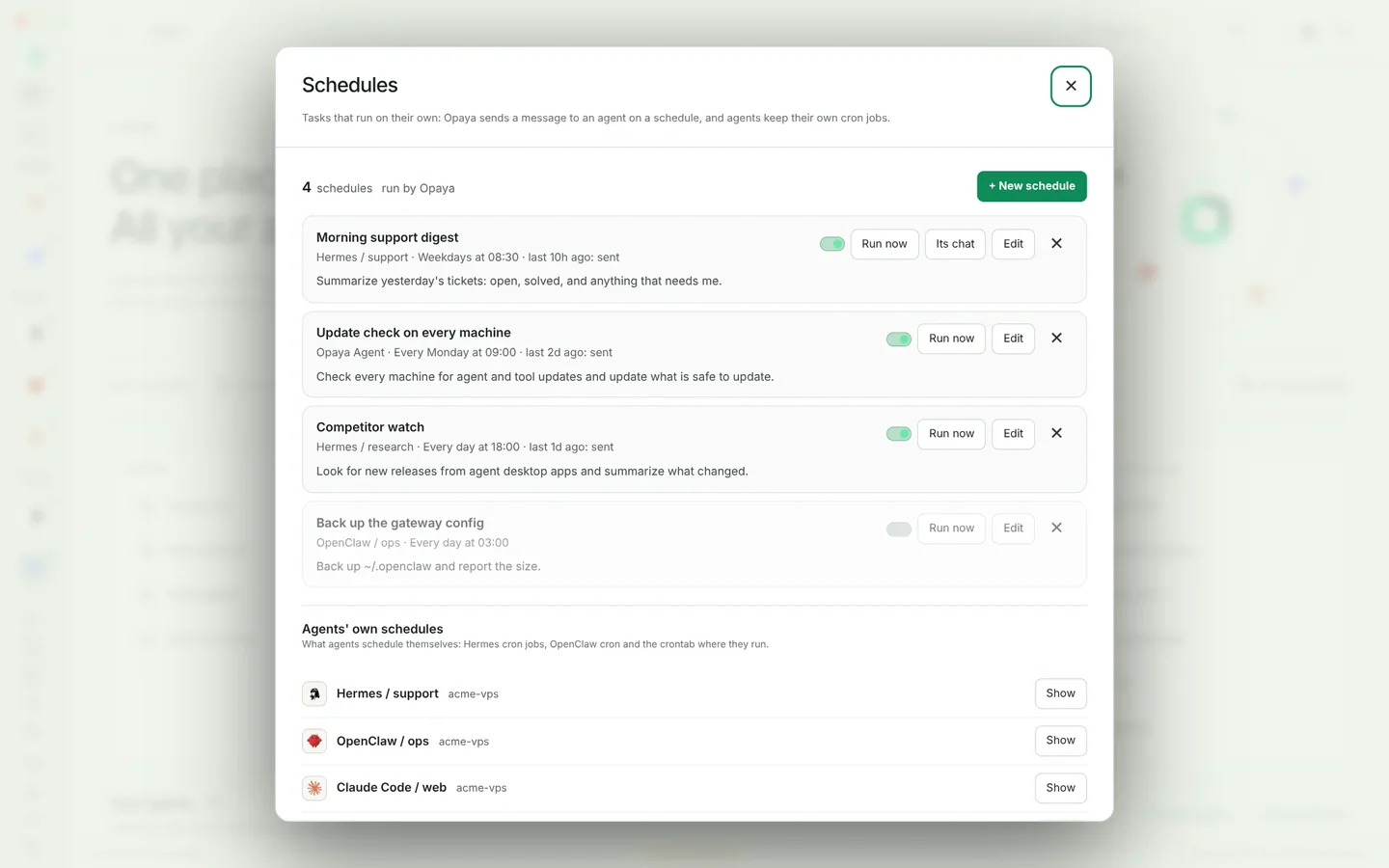
Choose a task with a bounded input, a verifiable artifact, and no destructive permissions. A daily digest is ideal because success is obvious: either the file exists with today’s date or it does not.
Every weekday at 08:00:
1. Read open issues labelled "triage" in repo X.
2. Write a markdown digest to /state/digests/YYYY-MM-DD.md.
3. Post the digest title and a link to channel #triage.

Do not comment on, close, label, or edit any issue.
If there are no matching issues, post nothing and write a one-line log entry.
The "do not" line is the most important part of the prompt, and the "post nothing" line is the second. Restricting write actions to a file it owns keeps the first workflow safe while you learn how the agent behaves.
Run it in three stages: a manual dry run where you read the artifact before anything is posted, a live run you watch in full, and only then a scheduled run. A workflow is complete when it produces the input, the tool calls, the artifact, the notification, a log entry with model and token counts, and a cost line — not when it produces a nice message.
Test Checklist for Your Hermes Agent Setup
Run these checks before you trust the agent with anything recurring.
- Fresh install: a clean environment from the lockfile reproduces the working setup.
- Restart persistence: restart the process or container; memory and skills survive; no re-authentication needed.
- Bad credential: an invalid key produces a clear error rather than a silent retry loop.
- Tool failure: a failing tool is reported honestly; the agent does not narrate success it did not achieve.
- Unknown sender: a message from a non-allowlisted user is ignored, and you can see that it was ignored in the log.
- Duplicate trigger: the same scheduled event fired twice produces one artifact, not two.
- Interrupted run: killing the process mid-run leaves state readable, with no half-written file treated as final.
- Backup restore: a restore into a clean environment reproduces memory as of the backup.
- Cost ceiling: a deliberately long run stays inside your provider budget.
- Log completeness: for any past run you can answer which model ran, what tools it called, what it produced, and how long it took.
Edge Cases to Plan for in a Hermes Agent Setup
- Scheduled trigger fires twice. Webhook retries and clock drift both cause this. Give each run an idempotency key derived from the date and task name, and make the artifact write atomic.
- Long sessions grow context. A channel that stays open for days accumulates history. Decide a compaction or session-reset policy early, and watch token counts for creep.
- Memory drift. Old facts persist after the world changes. Keep an edit path and review memory monthly; a confidently stale agent is worse than an ignorant one.
- Disk fills from logs. Set rotation and retention before the first scheduled run, not after the first outage.
- Upgrades break skill interfaces. Pin, then upgrade in a staging directory with a copy of state. Keep the previous version available for rollback.
- Host reboots and nothing comes back. Supervision is part of setup. Test it by rebooting the host once.
- Concurrent writers. Two people triggering the same task can write the same artifact. Serialise per workflow, or write to unique paths.
- Channel credentials expire. Bot tokens and OAuth grants get revoked. Put an expiry date next to the credential so the failure is not a surprise.
Logs, Updates, and Maintenance for a Long-Lived Hermes Agent
Log every run with a run ID, channel, model name, tool calls, token counts, duration, artifact paths, and any error text. Keep logs somewhere that survives a container recreate, redact secrets and message bodies you would not want retained, and rotate on a fixed schedule.
For updates: read the release notes, back up state, upgrade in a staging copy first, run the smoke example from the docs, then run one of your real workflows manually. Only after that, promote. Keep the previous version’s identifier written down so rollback is a command, not an investigation. A monthly pass — rotate keys, prune stale memory, review skill diffs, check spend against the budget — keeps a long-lived agent from becoming a mystery box.
Where OPAYA Fits in Hermes Agent Setup
Everything above is doable by hand, and worth doing by hand once. It becomes tedious at the third agent or the fourth environment, which is the point where install paths, channel connections, and state directories start to drift apart across a laptop, a remote host, and a container. OPAYA is a desktop workspace for installing, connecting, and managing AI agents across local machines, remote servers, and Docker, so those environments share one place to configure connections and check on what is running. Its features page describes the current capabilities; it does not remove the need for the decisions in this guide — it makes keeping them consistent less manual. If you already run several agents, that consistency is the part worth automating first.
Hermes Agent Setup FAQ
Do I need a GPU to run Hermes Agent?
Not for a typical setup. The agent runs as a process that calls a hosted model provider over the network. Local model hosting is a separate decision with its own hardware requirements. Check the docs for the runtime requirements of your chosen install method.
Can I run Hermes in Docker and keep memory across restarts?
Yes, if you mount a volume for the state directory and name that path explicitly in configuration. Without a volume, memory disappears every time the container is recreated. Verify by recreating the container and asking the agent something it learned yesterday.
How do I stop the agent from doing things I didn't intend?
Three layers: give the tools the smallest scope that works, write explicit prohibitions into the task prompt, and require a human checkpoint before anything irreversible. Start read-only and widen permissions only when a specific workflow demands it.
How often should I update Hermes Agent?
On a schedule you can keep, rather than continuously. The safer pattern is a regular upgrade in a staging copy with seeded state, a smoke test, and then promotion — plus a pinned version you can return to. Avoid tracking a moving branch in anything you rely on.
Can a team share one Hermes agent?
Technically yes, but decide deliberately whose memory it is. A shared agent needs its own state root, its own credentials, and clearer boundaries about what it retains from conversations. Running a personal and a team instance side by side is usually less confusing than sharing one.
How do I know the Hermes agent is working without watching it?
Make the output verifiable. A file at a known path with a date in the name, a notification on success, a log entry per run, and a check that alerts when an expected artifact is missing. Chat replies are the weakest possible signal.
A working agent on day one is really a working agent on day thirty — the setup matters less for what it does in the first hour than for whether you can still explain it in the second month. Get the five layers in place, run one bounded workflow, and only then add channels and permissions. If you would rather spend that time on the workflow than on keeping environments in sync, OPAYA is worth a look at opaya.dev.
Keep reading
A Serious Claude Code Setup: Projects, Skills and MCP Servers
Configuration, project instructions, skills and MCP servers arranged so Claude Code behaves the same on every machine.
Read article →
Codex CLI Setup: A Practical Walkthrough
Get Codex running locally and on a server with sane defaults for approvals, sandboxing and project context.
Read article →
How an AI Automation Agency Delivers an Agent to a Client
The delivery path that keeps client agent projects predictable, from discovery to a documented handover.
Read article →