 opaya
Running Agents for Ten Clients Without Losing Track
One mental model per client, not per tool.

Running agents for ten clients across three frameworks, two cloud accounts, several VPSes, and client-owned laptops is where instinct stops scaling. The usual failure is not a bad prompt or a broken tool call. It is not knowing which install belongs to which client, which key is live, or what changed last Tuesday. This guide gives agencies a repeatable operating model for managing agents for multiple clients: one boundary, one name, one vault, one calendar, and one report per client, regardless of host or framework. The steps are mostly tool-agnostic. Where OPAYA helps, it is called out; confirm current specifics on the agent manager and features pages before you standardize on them.
Organize by client, not by tool
Most teams organize by tool: the LangGraph box, the Claude Code machine, or the Docker setup on Hetzner. That model breaks as soon as two clients use the same tool, because the label no longer identifies the owner or the blast radius. Invert it. The top-level object is the client. Under it sit hosts, agents, credentials, backups, change windows, and the monthly report. When you look at a machine, a container, or a log line, the first question should be which client this is, and the answer should be visible in the first few characters of the name.
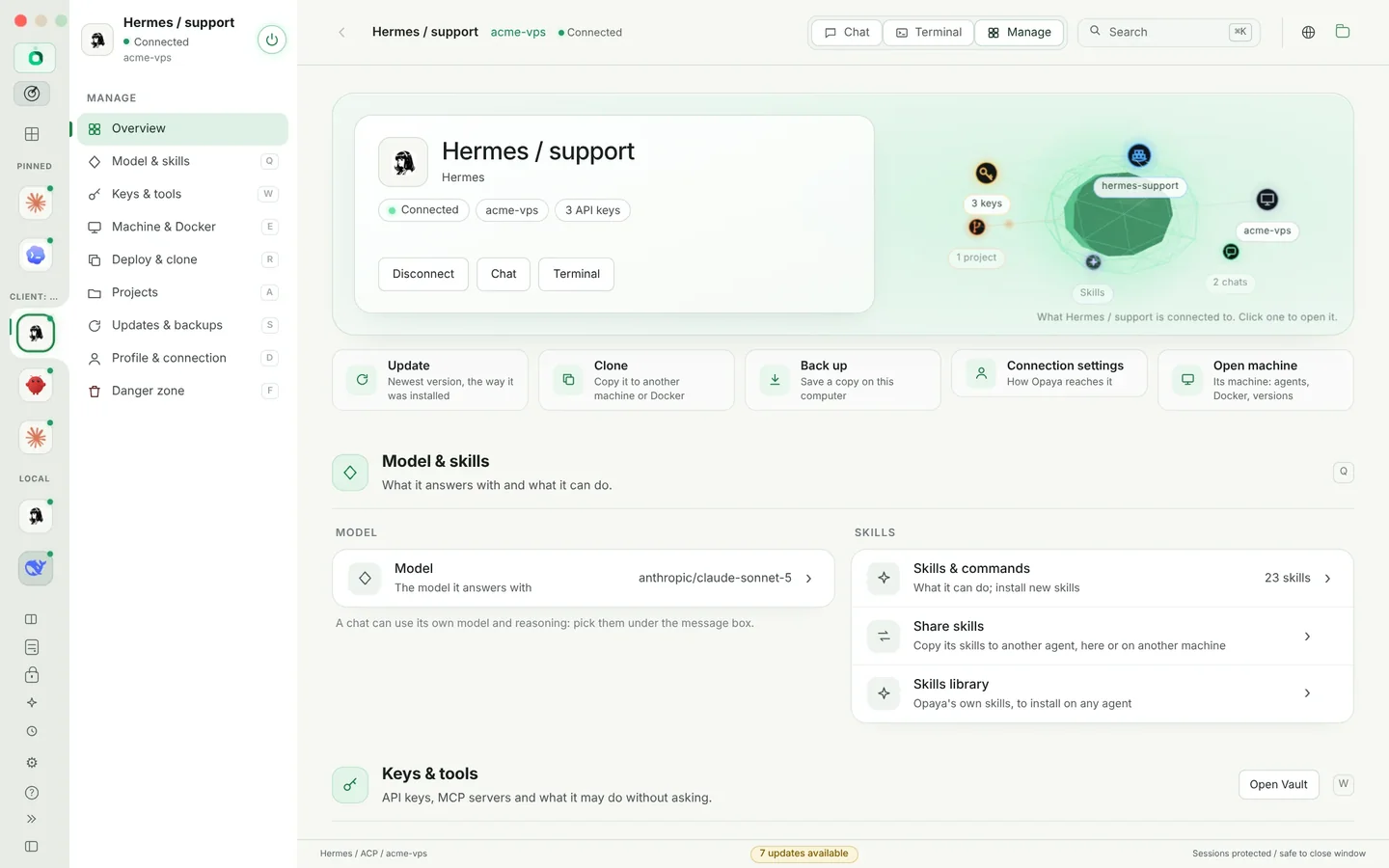
In OPAYA, this maps onto the workspace as the client container: a workspace holds the client's hosts, whether local machines, remote servers reached over SSH, or Docker targets, together with the agents installed on them. Choosing one workspace per client rather than one per tool keeps the boundary structural instead of relying on memory. If you keep a single agency workspace and label things by tool, you are back to the old model with extra steps.
What to gather before you start
Before you move anything, collect the following. Skipping this step is how a migration turns into an outage.
- An inventory of every client, host, and agent currently running, including the ones on someone's laptop.
- Administrative access to each host (SSH key or local account) and to any Docker daemon you use.
- A short scope note per client: what the agents do, which data they touch, and who at the client can approve changes.
- Write access to the credential store you will standardize on, plus an export path in case you need to move.
- Version pinning where the framework allows it, so an update is a decision rather than a surprise.
- A registry file (a spreadsheet is fine) with columns for client, host, agent ID, purpose, data class, owner, update window, and last verified backup.
- A baseline snapshot of each host or volume before you touch it.
Step 1: Isolate each client with separate machines or users
Isolation is the foundation, because every later control assumes you can tell client A's process from client B's. Two clients sharing one Unix account is the most common shortcut and the most expensive one: filesystem permissions stop meaning anything, an agent with shell access can read the other client's files, and a crashed container takes both relationships down at once.
Use a dedicated machine or VM per client where data sensitivity, contract terms, or data residency require it. Where that is not economic, use one OS user per client on a shared host, each with its own home directory, its own working directories, and its own service manager entries. Do not reuse accounts, and do not run agents as root.
On Docker, give each client its own compose project, named volumes, and network. Two details matter more than they look. First, never mount the host Docker socket into an agent container; it is effectively root on the host. Second, mount only the directories the agent needs, not the client's home directory.
In OPAYA, add each host once and label it with the client slug, so an agent is always attached to a host that belongs to exactly one client. When a client has both a staging and a production host, both carry the same slug and differ only in environment.
Step 2: Use a naming convention that scales
Names are cheap to fix at ten clients and painful at forty. Pick a pattern and write it down:
{client}-{env}-{role}-{nn}
For example, acme-prod-support-01 and northwind-stage-triage-02. Five rules keep it usable:
- The client slug is permanent and matches your CRM, contract, and invoice. Do not change it because a client rebrands; add an alias in the registry instead.
- Environment comes from a fixed set:
dev,stage,prod. No live, production, and prd in the same estate. - Role is a short word from a closed list (support, triage, research, ingest), not a sentence.
- Never encode vendor, framework, model, or a person's name in the identifier. Those change; the identifier should not. Put them in tags or metadata.
- Use the same string for the host label, the agent name, the directory, the Docker volume, the backup file, and the report title. One name, one object.
The test is blunt: from the registry alone, can a new team member find a named client's production agent in under fifteen seconds, and can they tell which host it runs on? If not, the convention has already failed.
Step 3: Keep one credential vault per client
Credentials are where multi-client work usually leaks. A shared .env file copied between projects, a model API key that works for every client because it is yours, or a database password pasted into a chat thread can each turn a single mistake into a cross-client incident.
Keep one vault per client, separate from the code repository, holding that client's model keys, tool OAuth tokens, database credentials, and webhook secrets. Inject them at runtime as environment variables or as references resolved by the agent manager; never bake them into an image or commit them to a repository. Where a vendor supports per-key limits or budgets, issue a distinct key per agent per client so one runaway loop cannot exhaust another client's quota, and so revocation is surgical.
Record two dates against every credential: when it was created and when it is due for rotation. On offboarding, revoke first and delete second; a deleted secret that was never revoked is still a live secret.
OPAYA keeps credentials alongside the connection and agent configuration in the workspace, which is the practical argument for making the workspace the client boundary: scope becomes structural rather than something an operator has to remember at 6pm on a Friday.
Step 4: Put update windows and approvals in writing
Updates are the change most likely to break a working system, and the one clients most often discover by noticing odd behavior. Put the arrangement in the statement of work: a defined maintenance window, a notice period before non-urgent changes, a named approver on the client side, and an explicit emergency path for security fixes that bypasses the window with notice after the fact.
Operationally, pin versions and update deliberately. Roll out to the staging host first, run the checklist below, then promote to production. Read the changelog for the agent framework, the model provider, and any MCP servers or tools in the chain, paying particular attention to tool schema changes and model deprecations. Record the window in the registry and set calendar reminders, because the agreement is worthless if nobody is watching the date.
Batching several clients into the same window reduces context switching, which is good. Mixing their credentials, hosts, or data in that window is not; keep the work separate even when the calendar slot is shared.
Step 5: Back up before every upgrade
A backup taken after an upgrade is not a backup; it is a hope. Before you change a version, capture the agent configuration, the workspace files the agent depends on, any database or vector store, Docker volumes, an encrypted export of the client's vault, and a host-level snapshot if your provider offers one.
Copy at least one backup off the host, name it with the convention plus a UTC timestamp, for example acme-prod-support-01_2025-11-18T0900Z, and record the backup ID in the change log next to the version you are leaving. Keep the previous image or configuration until the new one has passed the checklist, so rollback is a restore and restart rather than a rebuild.
A backup you have never restored is an untested assumption. Schedule a restore drill, even quarterly, into a scratch host, and confirm the agent starts and completes one realistic task.
Step 6: Send a monthly health report per client
The report is the artifact that turns ten separate relationships into a managed portfolio. It also makes renewals easier, because you are discussing evidence rather than impressions. One page per client, same date every month, covering:
- Availability and failed runs, with incidents and time to resolution.
- Current agent and host versions, and the next agreed update window.
- Credential age and anything due for rotation.
- Resource usage: disk, memory, and token or API spend where the provider exposes it.
- The date of the last verified backup and restore drill.
- Risks, and two or three recommended actions with an owner.
Automate the collection as far as you can: logs, host state, and agent status in OPAYA are the raw material, and a templated document with a fixed structure keeps the comparison honest across clients. Manual numbers typed from memory defeat the purpose.
Test checklist after setup and structural changes
Run this after setup and again after any structural change. Each item should have a pass condition, not a vibe.
- Isolation: from client A's agent, attempt to read a client B directory. Expect permission denied, not a listing.
- Naming: pick three random clients and locate their production agent from the registry alone; check host label, directory, and backup name all match.
- Vault: rotate one credential and confirm the agent picks up the new value after restart, with no repository edit and the old value rejected.
- Update: perform one staged update end to end and time the rollback.
- Restore: restore a configuration and volume to a scratch host; the agent answers one real prompt correctly.
- Offboarding dry run: revoke keys, stop agents, archive data, and confirm no live token remains for that client.
- Reporting: generate the monthly report without manual copying, and reconcile two numbers against the source logs.
- Cross-tool: where one client uses two different agent frameworks, confirm both follow the same name, vault, and update calendar.
Edge cases worth planning for
The client wants their own cloud account
Fine, but the host entry still carries the client slug, and your access is a named, documented role that can be revoked when the engagement ends.
A contractor needs access
Add them as a separate user with a time limit, and give them a scoped token rather than the vault password. Never share one login across people; attribution disappears.
A client leaves mid-month
Revoke, then archive, then delete, in that order, and keep whatever copy the contract requires.
A model or tool is deprecated
Treat it as an unscheduled update: assess impact, notify, book the earliest window, and use the same staging and backup path. Do not hot-patch production on a Friday.
An agent runs on a laptop that is offline
Report uptime honestly and separate scheduled downtime from unknown. A client who sees unknown every month will ask better questions than one who sees a fabricated 99.9%.
Shared rate limits
Per-client keys or budgets prevent one client's spike from starving another client's agents.
Prompt injection with shell access
Restrict the tools each agent can call, avoid broad filesystem mounts, never expose the Docker socket, and assume any credential reachable from the agent's process can be exfiltrated.
Two agents in one container
Split them. One agent per container and per user keeps logs, permissions, and rollback clean.
Tradeoffs: containment versus cost
This model costs more than the ad-hoc version. A VM per client is more expensive than a shared host with a single account, per-client vaults mean more rotation work, and pinned versions delay access to new features. The trade is that failures stay contained and recovery is fast, which matters more as the number of clients grows. Match the isolation level to the data class: a research assistant summarizing public articles and an agent with write access to a client's CRM should not get the same treatment.
FAQ
Do I really need a separate machine for every client?
Not always. A separate OS user, separate directories, a separate Docker project, and a separate vault per client is a defensible baseline for many small engagements. Dedicated machines or VMs become the right default when the client's data is sensitive, their contract requires it, or data residency rules apply.
Should the naming convention include the agent framework?
No. Frameworks change and the identifier should not. Keep the framework in tags or metadata, and keep the name stable so logs, backups, and reports stay linked across a migration.
How often should credentials rotate?
Follow the client's policy where one exists, and set a fixed cadence where none does. The important part is that rotation is scheduled, recorded, and tested, not that it happens on a particular day of the month.
Can one OPAYA workspace hold several clients?
A workspace can hold several hosts and agents, but the operating model in this guide deliberately uses one workspace per client so the boundary is structural rather than remembered. Check the current feature documentation for how workspaces, hosts, and credentials are scoped before you decide.
What belongs in the monthly report if the client only has one agent?
The same structure, shortened. Availability, version, next window, credential age, last verified backup, and one recommended action are enough to keep the relationship on evidence rather than recollection.
How do we handle an emergency security fix outside the window?
Fix it, then notify. The written agreement should say that security fixes can ship immediately, who may authorize them, and what documentation follows within a day, including the backup taken and the rollback plan used.
Next action: start with one client
Pick one client this week, not all ten. Create its registry row, fix the name so it matches the pattern, put its host and agents inside their own boundary, move its credentials into a client-scoped vault, and book its update window. Write down the backup you took before you started. Next month, send that client the one-page health report. Once the loop works for one client, repeat it as an onboarding checklist for the next, and the ninth and tenth will cost a fraction of the first.
If you want a single desktop place to hold those per-client hosts, agents, and credentials, OPAYA is built for exactly that: installing and managing agents on local machines, remote servers, and Docker, with the client workspace as the boundary. Start with one client and see whether the model fits your practice at opaya.dev.
Keep reading

The Client Handover Pack for an AI Agent
A handover kit that prevents month-two support calls: access, runbooks, limits and escalation paths.
Read article →
How an AI Automation Agency Delivers an Agent to a Client
The delivery path that keeps client agent projects predictable, from discovery to a documented handover.
Read article →
Running Hermes on a VPS With Telegram
Deploy Hermes to a server, connect Telegram and keep it responsive without babysitting it.
Read article →