 opaya
Claude Code on a VPS: Remote Work That Feels Local
Same muscle memory, different machine.

Running Claude Code on a VPS can feel almost identical to running it on your laptop — if you treat the remote host as a stable workspace, not a remote desktop. Claude Code is a terminal tool, so it does not much care whether that terminal is attached to your laptop or to a VPS in another region. Everything around the terminal cares: how you connect, how project state stays consistent, how a session survives a closed lid or a dropped train connection, and how much damage one wrong command can do on a machine you are not sitting in front of. This guide is a working setup for developers who already run Claude Code every day and want to move long refactors, builds and test loops onto a server without relearning how they work.
Same muscle memory, different machine.
What “Remote but Local” Means for Claude Code on a VPS
Remote work that feels local is not a remote desktop with extra steps. It is a narrow set of properties: one command to connect, the same repository at the same path on both machines, a session that outlives your network, logs you can read after the fact, and a permission boundary that stops the agent from doing the one thing you cannot undo. Get those five and you stop thinking about the VPS. Miss any one of them and you will be copying files by hand at 1 a.m.
Be honest about the tradeoffs first. You gain a machine that never sleeps, more CPU and RAM than your laptop, a stable Linux target, and a shared box a teammate can use for the same task. You give up drag-and-drop file handling, native clipboard behaviour, image pasting, and the safety net of a local trash folder. Latency changes the feel of an interactive terminal too: a 200 ms round trip is fine for reading output and irritating for full-screen redraws.
Prerequisites for a Claude Code VPS Setup
- A VPS with a non-root user that has sudo, plus a provider snapshot or backup you have actually restored once.
- An ed25519 SSH key pair with a passphrase, loaded into ssh-agent on your laptop.
- A git remote both machines can reach: GitHub, GitLab, or a bare repository hosted on the VPS itself.
- Node.js at a version the current Claude Code documentation lists as supported, installed into a user-owned path.
- tmux (or an equivalent multiplexer) and rsync on the server.
- An authentication decision: interactive login, or an API key scoped to that host. Check the Anthropic documentation for the options that currently apply to headless machines.
- A written rule for who else can log into the box, because an agent with a shell is only as safe as the accounts around it.
Step 1: Make SSH Boring Enough to Forget
Create the key once on your laptop and copy only the public half to the server. The goal is a single alias, cc-vps, that never prompts for a hostname or a password.
ssh-keygen -t ed25519 -C "you@laptop"
ssh-copy-id -i ~/.ssh/id_ed25519.pub dev@203.0.113.10
Then write the alias into ~/.ssh/config so keep-alives and identity selection are automatic:
Host cc-vps
  HostName 203.0.113.10
  User dev
  IdentityFile ~/.ssh/id_ed25519
  IdentitiesOnly yes
  ServerAliveInterval 30
  ServerAliveCountMax 3
On the server, disable password authentication in /etc/ssh/sshd_config.d/, run sudo sshd -t to validate the config, and restart the service — keeping your current session open until a second terminal connects successfully. Skipping that validation step is how people lock themselves out of a fresh host. Avoid agent forwarding on a machine other people can log into; forward the specific capability you need, not your whole keychain.
Step 2: Install Claude Code on the VPS and Authenticate
Install Node through your distribution or a version manager, then install Claude Code globally into a user-owned prefix so you never need sudo for npm:
node --version
npm install -g @anthropic-ai/claude-code
claude --version
claude
The first interactive run walks you through authentication. On a headless host the browser callback cannot reach your laptop, so follow the documentation’s headless instructions — typically copying the sign-in URL into your local browser, or supplying a key through the environment. If you choose an environment variable, keep it in a file with chmod 600, sourced from your shell profile, and never inside the repository.
Before you trust the install, run the health and diagnostic commands the documentation recommends and confirm the working directory it reports is the one you expect.
Step 3: Build Project Parity Between Laptop and Server
Parity is mostly about paths and versions. If the repository lives at ~/code/api on your laptop, put it at ~/code/api on the VPS. Relative references in notes, scripts and permission rules then behave identically, and your own habits transfer without translation.
- Same runtime. Pin Node with
.nvmrcor.tool-versions, commit it, and install the same version on both machines. - Same lockfile. Install with the lockfile, not with a floating range, and commit any change the server produces.
- Same instructions. Keep
CLAUDE.mdin the repository so the agent reads the same project context on either machine. - Same permissions baseline. Commit shared rules in the project settings file, and keep machine-specific overrides in the local settings file that stays gitignored.
- Same identity. Set
user.nameanduser.emailin the server’s git config; otherwise commits authored by the agent look like they came from nobody.
A quick parity check before each remote session: git rev-parse HEAD and node --version on both machines should match, and git status should be clean on the one you are not using.
Step 4: Use tmux as Your Claude Code Session Layer
Never run a long agent session in a bare SSH shell. One dropped connection ends it. tmux costs one command and eliminates the problem entirely.
tmux new -s cc
tmux set -g history-limit 50000
tmux set -g aggressive-resize on
# Ctrl-b then d to detach; close the laptop
tmux ls
tmux attach -t cc
Two habits make this durable. First, name sessions after the task, not after the tool, so tmux ls reads like a task list. Second, turn on pane logging so a detached session still produces evidence: tmux pipe-pane -o 'cat >> ~/logs/cc-$(date +%F).log'. If you work from a flaky mobile link, mosh smooths reconnects considerably, but it needs UDP, which some corporate networks block — keep plain SSH with keep-alives as the fallback.
Claude Code also retains session history per project and supports continuing or resuming conversations, which matters when a tmux server is lost. Rely on tmux for persistence and on the tool’s own history for context recovery; they solve different failures.
Step 5: Choose One File Sync Discipline
Most remote-work pain comes from two machines editing the same file with no owner. Pick rules and enforce them.
- git is the only channel for tracked files. Pull before you start, push before you detach. No exceptions, no manual copying of source files.
- rsync is only for untracked artifacts — fixtures, database dumps, generated reports, local
.envfiles. Always dry-run first:rsync -avn --exclude '.git' --exclude 'node_modules' --exclude '.venv' ./ cc-vps:~/code/api/, then repeat without-n. - One writer at a time. If the agent is refactoring on the server, do not edit the same file locally. Read-only browsing is fine; parallel editing is not.
- Never run
rsync --deletefrom a laptop over a working tree. It is the fastest way to delete a day of agent work. - Treat
.envas host state. Sync it once, deliberately, and keep it out of git and out of rsync excludes you might accidentally invert.
If your provider’s network to the git host is slow, a bare repository on the VPS as a second remote gives you a fast local push target while still keeping commits as the unit of sync.
Step 6: Make Logs and Restarts Predictable
For interactive work, the log is the tmux pipe file plus the tool’s own session transcripts. Both live in your home directory, so both are covered by your backup policy — verify that, because transcripts are often the only record of what an agent changed and why.
For unattended or scheduled work, wrap non-interactive runs in a user systemd unit rather than nohup. You get restart policy, exit codes and journald for free:
[Unit]
Description=Claude Code batch task
After=network-online.target

[Service]
WorkingDirectory=%h/code/api
ExecStart=/usr/bin/env bash -lc 'claude -p "run the nightly cleanup"'
Restart=on-failure
RestartSec=30

[Install]
WantedBy=default.target
Then systemctl --user enable --now cc-batch and follow output with journalctl --user -u cc-batch -f. Add log rotation and a disk check: long agent runs produce verbose output, and a full disk breaks builds in ways that look like agent failures.
Step 7: Gate Destructive Commands and Permissions
On your laptop a bad command is an inconvenience. On a shared server it can take down a service or a teammate’s work. Layer the defences instead of trusting one:
- Non-root by default. The agent runs as your user. sudo requires a password you type yourself.
- Deny rules in settings. Claude Code supports permission rules that allow or deny specific tool patterns, so a deny entry for force-pushes or recursive deletes blocks them regardless of what the agent decides to try. Rule syntax is prefix-pattern based and has changed across releases — confirm the current form in the permissions documentation before you rely on it. A typical shape:
{
  "permissions": {
    "deny": [
      "Bash(git push --force:*)",
      "Bash(rm -rf /:*)"
    ]
  }
}- Hooks for audit and veto. A pre-tool hook can log every command the agent is about to run, or refuse the ones that match your own patterns. Logs first, blocks second — you learn what normal looks like before you start denying.
- Git as an undo button. Branch per task, commit small, and start large refactors from a clean tree. Recovery becomes a diff, not a rebuild.
- A snapshot before the big one. Provider-level snapshots are cheap and cover the cases git does not: deleted untracked files, corrupted databases, a wrecked home directory.
- One account per person or per agent. Shared logins destroy attribution and make deny rules almost meaningless.
If you run Claude Code inside a container on the host, mount the repository and nothing else. Your SSH key and cloud credentials should not be visible from inside a working directory an agent can write to.
Test Checklist Before You Trust the Setup
| Check | How to test | Pass criteria |
|---|---|---|
| Reconnect | Start a session, detach, close the laptop, reconnect and attach | Session and scrollback intact |
| Parity | Compare git rev-parse HEAD and node --version | Identical on both machines |
| Clean install | Clone into a temporary path and run the test suite | Tests pass without manual fixes |
| Permission gate | Ask the agent to run a denied command | Blocked, with a clear refusal message |
| Log capture | Inspect the pipe-pane file after a few prompts | Output present and growing |
| Restart | Kill the systemd unit mid-run | Restarts, journal shows exit reason |
| Restore | Delete an untracked file, restore from snapshot or git | File recovered, restore path documented |
| Secrets | Check permissions and git check-ignore | Env file is 600 and untracked |
| Disk | Check free space after a long run | Healthy headroom, rotation configured |
Edge Cases to Plan For
- Headless authentication and SSO. Org policies that require browser-based SSO need a documented workaround; test it before you need it, not during an incident.
- High-latency links. Full-screen terminal UIs redraw slowly over 300 ms. For deep interactive work, run locally and reserve the VPS for long batch jobs.
- npm permission errors. Global installs into system directories are the usual cause. Use a user-owned prefix or a version manager instead of sudo.
- Multiple agents on one host. Two long agent sessions will fight over CPU, ports and disk. Separate users or containers, and monitor load.
- Network egress and firewall rules. Vendor endpoints, package registries and git hosts all need to be reachable; allowlist deliberately rather than disabling the firewall.
- Agent writes outside the repo. Set the working directory explicitly and deny access to paths outside it, then check the transcript for surprises.
Where OPAYA Fits in a Remote Claude Code Workflow
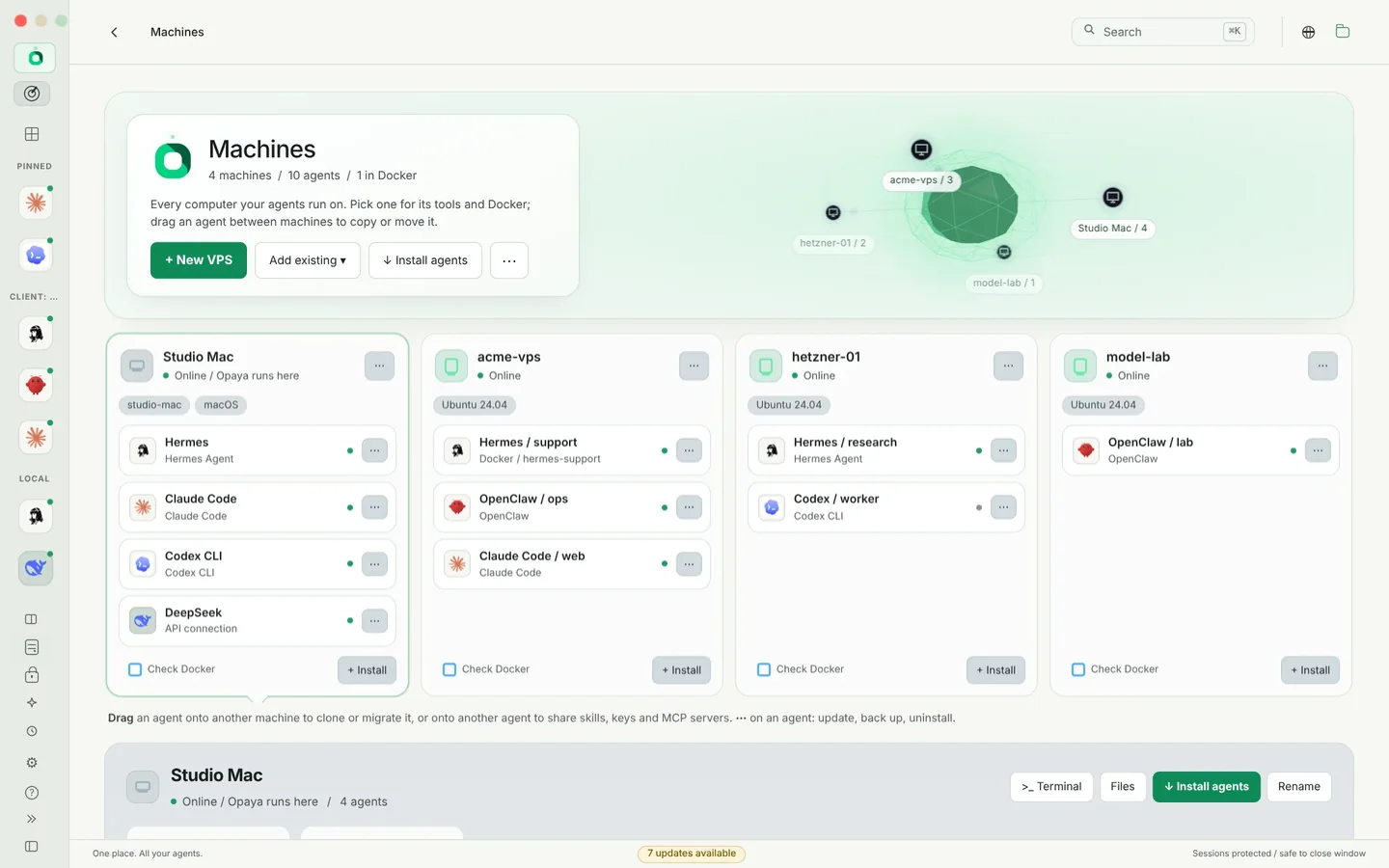
Everything above is the substrate: SSH, paths, tmux, permissions. If you operate several agents across a laptop, a couple of servers and a Docker host, the overhead becomes inventory — which agent runs where, with which credentials, and whether the connection is actually alive. OPAYA is a desktop workspace for installing, connecting and managing AI agents on local machines, remote servers and Docker, with agent managers for keeping those connections and configurations in one place. It does not replace the SSH and permission discipline in this guide; it gives you a single view over it.
FAQ: Claude Code on a VPS
Can Claude Code run on a small VPS?
Yes. The agent itself is light, but the work it triggers is not: builds, test suites, language servers and dependency installs drive sizing far more than the CLI does. Give Node and your toolchain room, watch memory during large test runs, and resize based on what your project actually consumes rather than a generic minimum.
Should I edit code on the server or sync from my laptop?
Pick one primary writer. Most teams keep editing local and use the server for long-running or resource-heavy work, syncing through git. Editing directly on the server over SSH is fine when latency is low and you commit often; it becomes painful when two people share the box.
Do I still need tmux if the tool keeps session history?
Yes. Session history lets you resume a conversation; tmux keeps a running process alive across network drops. Without a multiplexer, a disconnected shell can terminate a build or a long agent run in progress.
How do I stop the agent from deleting something important?
Use layered controls: a non-root account, deny rules for known-dangerous command patterns, a pre-tool hook that logs commands, task branches committed often, and provider snapshots for anything git does not cover. Verify your deny rules actually fire — an untested rule is a false sense of security.
Is it safe to keep an API key on the server?
It is a normal operating tradeoff, not a guarantee. Scope the key to a single host or workspace where the provider supports it, restrict file permissions, keep it out of git and out of container mounts, and rotate on a schedule or whenever someone leaves the project.
Your Next Action
Do the smallest end-to-end slice today: create the cc-vps alias, install Claude Code on the host, clone one repository to a mirrored path, and run its test suite from inside a named tmux session. Detach, close the laptop, reattach. If that works, add your deny rules and a snapshot before the first large refactor — and only then move real work over. If you would rather manage that growing set of hosts and agents from one place, the OPAYA agent managers workspace is built for exactly that, and you can read about it at opaya.dev/agent-managers.
Keep reading
Managing Several Claude Code Sessions Without Chaos
A naming and branching system for running more than one Claude Code session at a time.
Read article →
A Serious Claude Code Setup: Projects, Skills and MCP Servers
Configuration, project instructions, skills and MCP servers arranged so Claude Code behaves the same on every machine.
Read article →
Running Hermes on a VPS With Telegram
Deploy Hermes to a server, connect Telegram and keep it responsive without babysitting it.
Read article →