 opaya
opayaClone an agent to Docker
Make a tested setup repeatable. Move only what the next environment actually needs.
Before you start
A working source agent, a connected destination machine and permission to use Docker there. Back up the source first, and use a staging destination before production.
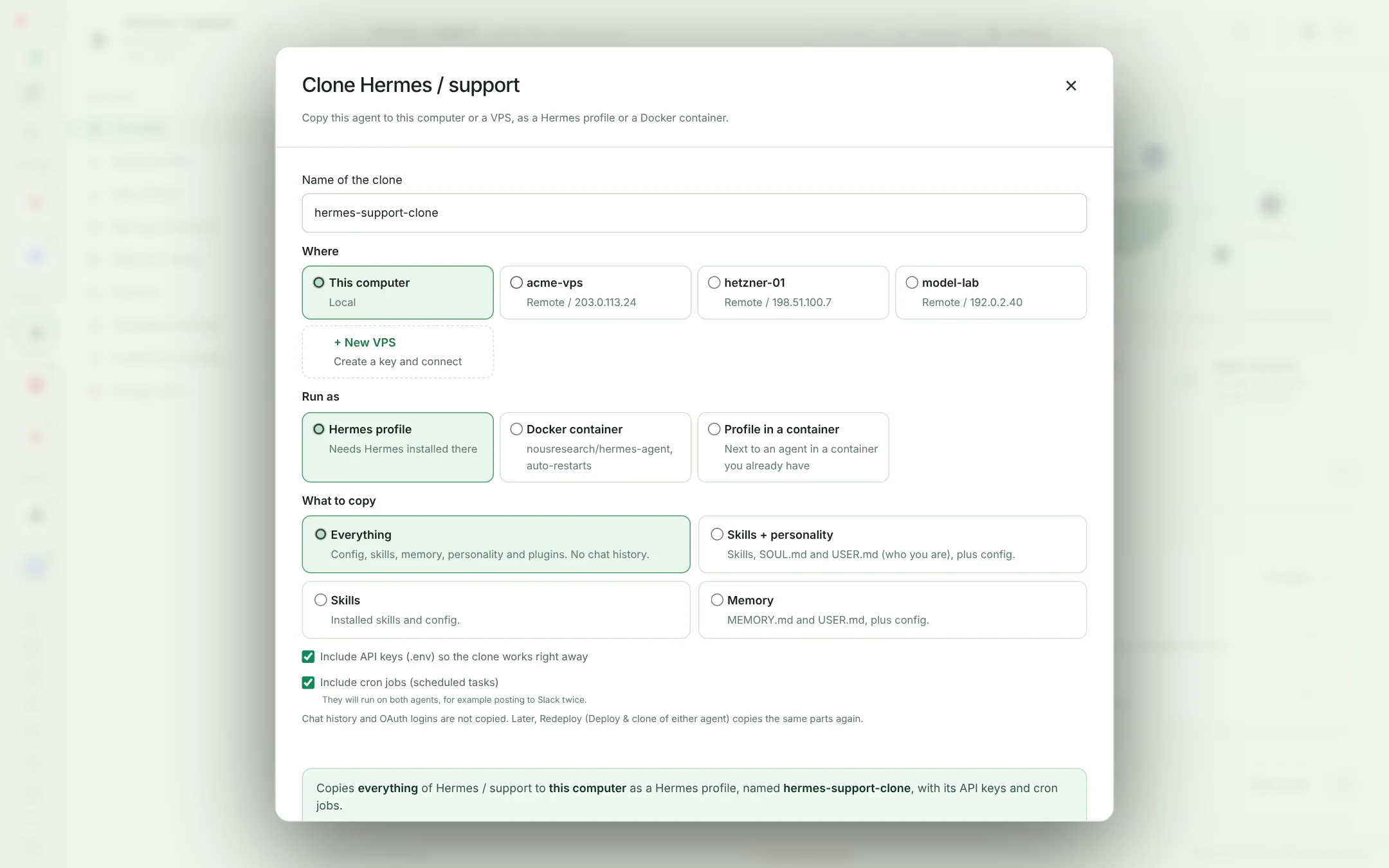
Choose the source and destination
Open Clone for the source agent and choose the target machine and Docker destination. Check available disk space, runtime requirements and the destination project paths.
Select the configuration
Review settings, instructions, skills and other supported transfer items. This is a configuration workflow, not a promise to duplicate a running process or every file on the source computer.
Review credentials separately
Transfer only credentials you are authorized to use on that machine. Prefer a destination-specific key. Do not copy a personal production key into a client or staging environment by default.
Verify before switching over
Start or connect the destination agent and run a small test. Confirm volumes, provider access, schedules and external integrations. Keep the source intact until you have a working destination and a recovery plan.
Before you continue
Avoid two copies executing the same scheduled job or responding to the same integration at once. Decide which instance owns the workload before enabling automation on the clone.
Read the security and data modelStart with the agents you already use.
Desktop for local and remote work. Web for your remote agents.