opaya
opayaThe Vibe Coder's Stack: Every Agent in One Window
One workspace instead of six terminals.

The era of writing every single line of syntax by hand is steadily giving way to a new paradigm of software development. Today’s most productive solo builders and small teams operate as conductors rather than soloists, directing an orchestra of specialized AI agents to generate, refactor, and debug code. This workflow—often referred to as vibe coding—is less about memorizing boilerplate and more about maintaining momentum, architectural vision, and continuous iteration. However, as the ecosystem of AI developer tools explodes, the actual experience of vibe coding has become increasingly fragmented. Developers often find themselves managing half a dozen terminal windows, web browsers, and disparate application interfaces just to get their agents to cooperate.
To truly unlock the speed and efficiency promised by AI-assisted development, you need a cohesive vibe coding stack. The goal is to establish one home for every agent instead of separate terminals, keeping your tools, repositories, and context unified. In this guide, we will explore how to architect a unified workspace that groups agents by project, integrates vital context like file systems and version control, and leverages strategic model tiering to balance cost and capability.
The 4 Core Elements of a Unified Vibe Coding Stack
Building an effective workspace requires moving away from the scattered, vendor-siloed approach of the past. A substantive vibe coding stack relies on four foundational pillars. Each addresses a specific friction point in the modern developer's workflow, offering a clear implementation path, distinct benefits, and realistic limitations.
1. Centralizing the Workspace: One Home for Every AI Agent
The Situation: The average developer leveraging AI tools today is bouncing between multiple disconnected environments. You might have an open-source agent running in one terminal via Docker, a proprietary CLI agent in another, a web-based chat interface open in your browser, and a local server running background tasks. This context switching destroys the vibe and creates massive cognitive overhead. When an error occurs, you are forced to hunt through various windows to find the relevant output, logs, or agent history.
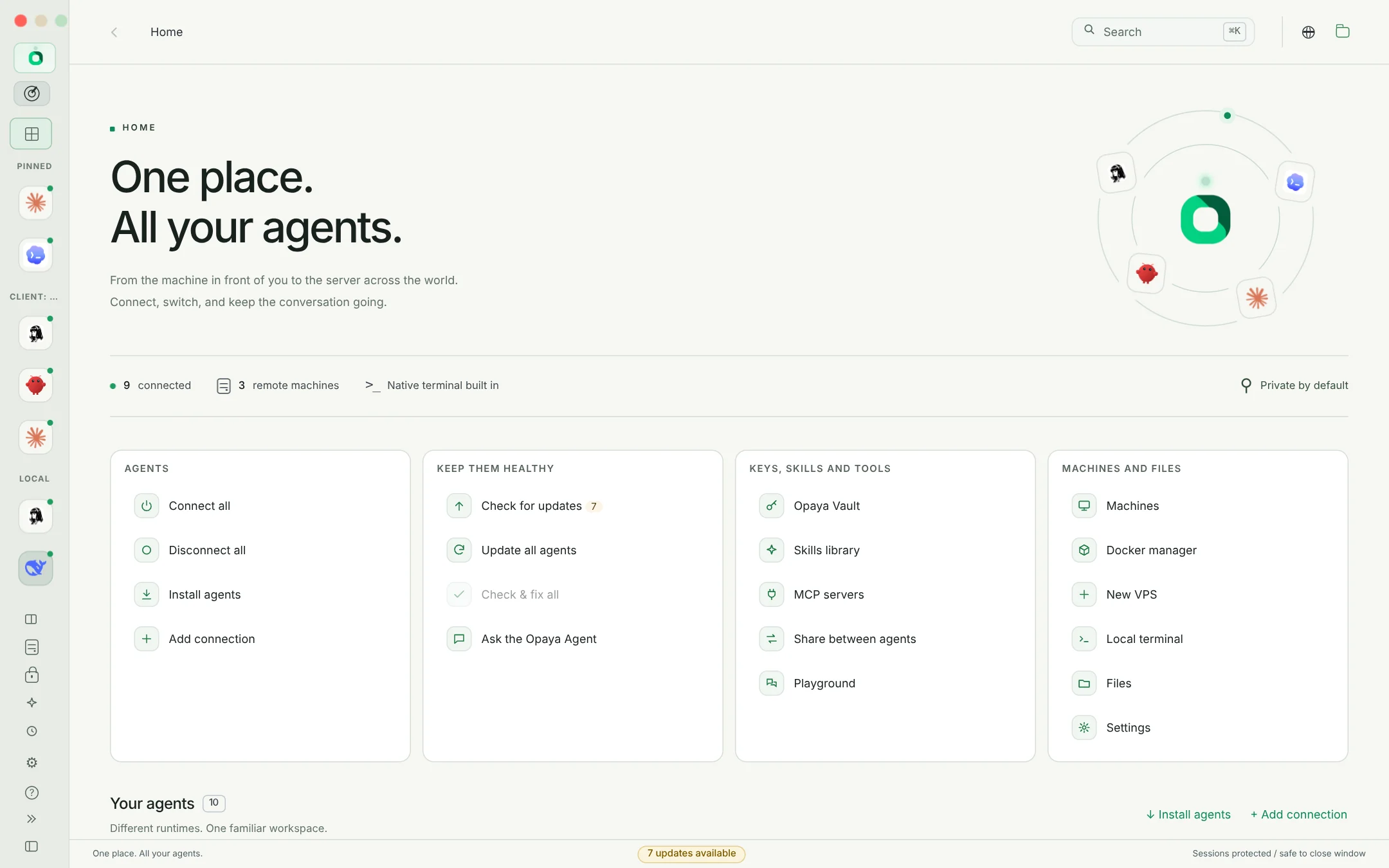
The Implementation: The solution is to utilize a unified desktop workspace that can install, connect, and manage AI agents across different environments—whether they are running on local computers, remote servers, or within Docker containers. By piping the inputs and outputs of these diverse agents into a single pane of glass, you create a centralized command center. This allows you to monitor an agent modifying a frontend component while another simultaneously runs backend tests.
The Benefit: Centralization drastically reduces cognitive load. You gain a single source of truth for all agent activity, making it easier to orchestrate complex multi-agent workflows. It allows solo builders to act as true project managers, overseeing parallel streams of AI-generated work without losing track of broader architectural goals.
The Limitation: It is critical to avoid claiming identical feature parity across vendors. Because agents are built with different underlying architectures, a unified interface may not support every proprietary bell and whistle unique to a specific vendor's native application. You trade niche, vendor-specific UI features for massive ecosystem-wide orchestration.
2. Project-Based Grouping: Organizing by Context, Not Vendor
The Situation: Most AI tools naturally push you to organize your work by their specific ecosystem. If you open a vendor's application, you are presented with a generic chat interface or prompt bar isolated from your actual code. If you are working on a Python backend and a React Native mobile app simultaneously, managing the context for your agents across these two distinct projects within a vendor-centric tool is clumsy and error-prone.
The Implementation: Structure your vibe coding stack to group agents by project. In a unified workspace, create a dedicated environment for "Project Alpha" and assign specific agents to it. When you open that workspace, the agents present are inherently scoped to the repository, environment variables, and specific instructions relevant to that exact codebase.
The Benefit: Context is strictly sandboxed. Agents assigned to a specific project will not accidentally hallucinate dependencies or conventions from an unrelated project. This significantly improves accuracy and reduces time spent writing repetitive prompting instructions to establish baseline context.
The Limitation: Grouping by project requires more upfront configuration. Instead of just firing up a global AI chat window, you must take the time to map your agents, local file paths, and environment settings to specific project workspaces before you begin coding.
3. Integrated Context: Keeping Terminal, Git, and Files Next to the Agent
The Situation: AI agents operate poorly in a vacuum. If an agent suggests a massive refactor but cannot see your current file tree, execute a test command, or review the resulting git diff, you are reduced to manual copy-and-pasting. You end up copying code from the agent, pasting it into your editor, running the terminal command yourself, copying the error message, and pasting it back to the agent. This is not vibe coding; this is manual labor.
The Implementation: A robust vibe coding stack must keep the terminal, git version control, and file explorer immediately next to the agent. Your unified workspace should allow agents to read the file state directly, propose changes that you can review as standard git diffs, and execute validation scripts within an integrated terminal window.
The Benefit: Real-time validation and seamless iteration. When an agent can see the immediate terminal output of its code, it can self-correct errors without intervention. Reviewing agent work via side-by-side git diffs ensures you maintain absolute control over repository commits, combining AI speed with traditional version control safety.
The Limitation: Granting agents access to your file system and terminal introduces inherent security and operational risks. Agents could theoretically execute destructive commands. This architecture demands a human-in-the-loop review process and strict version control branching strategies to mitigate potential damage.
4. Strategic Model Tiering: Balancing Local vs. Frontier Models
The Situation: Many developers default to sending every prompt and code generation request to the most powerful, expensive frontier models available via API. Whether asking for complex system architecture or simply formatting a JSON object, they burn through tokens. This approach is financially inefficient and unnecessarily exposes sensitive proprietary code to third-party servers.
The Implementation: A mature vibe coding stack incorporates model tiering. You should routinely reach for a free local model when the task does not need a frontier model. By managing lightweight, locally hosted models alongside cloud-based frontier models within your unified workspace, you route tasks based on complexity. Use local models for scaffolding boilerplate or writing documentation, and reserve heavy-hitting frontier models for deep architectural refactoring and complex debugging.
The Benefit: This dual-tiered approach dramatically reduces operational costs and token consumption. Furthermore, utilizing local models for basic tasks allows you to work offline and provides a secure, private environment for highly sensitive code that cannot be sent to external APIs.
The Limitation: Local models generally possess smaller context windows and lower reasoning capabilities compared to frontier counterparts. They are more prone to hallucinations on complex, multi-file operations. You must develop the intuition to know exactly when a task exceeds a local model's capabilities.
Architectural Tradeoffs in the Multi-Agent Ecosystem
While consolidating your tools into a single vibe coding stack offers immense benefits, it is vital to understand the architectural tradeoffs involved. Managing multiple agents across diverse environments (local, remote, Docker) introduces orchestration complexity. You are shifting the burden from manual context switching to workspace management.
Furthermore, standardizing your interface means abstracting away some underlying vendor specifics. An agent running in a Docker container might interact with the file system slightly differently than a locally installed binary. Understanding these subtle differences across connection protocols is a necessary learning curve for any operator running a multi-agent setup.
Practical Steps: Assembling Your Developer Workspace
Transitioning from a fragmented setup to a cohesive vibe coding stack requires a methodical approach. Follow these practical steps to implement the architecture described above:
- Audit Your Current Agents: Make a comprehensive list of all the AI tools, CLI agents, and web interfaces your team currently uses. Categorize them by deployment type (local application, remote API, Docker container).
- Establish Project Boundaries: Define distinct projects. Map out absolute paths to local repositories, necessary terminal environments (e.g., Node versions, Python virtual environments), and specific agents required for each codebase.
- Deploy Local Models: Install and configure a local model runner. Download efficient, coding-specific local models that run freely without API costs for baseline tasks.
- Integrate Version Control: Ensure every project workspace is securely tied to git. Never allow an agent to modify files where changes cannot be instantly reverted. Commit your current state before unleashing an agent on a massive refactor.
- Configure the Unified Interface: Utilize a desktop workspace manager to bring these elements together. Connect Docker containers, link remote servers, and map local models into project-specific dashboards where the terminal and file explorer sit adjacent to the agent chat.
Workspace Verification Checklist
Before relying on your new vibe coding stack for production work, run through this verification checklist to ensure everything is properly sandboxed and integrated:
- Are agents strictly restricted to the file paths of their assigned project?
- Can you view git diffs of agent-proposed changes before they are finalized?
- Is the terminal environment adjacent to the agent utilizing the correct environment variables for the specific project?
- Can you seamlessly toggle between a free local model and a frontier API model within the same project interface?
- Are remote servers and Docker containers connecting securely to the unified workspace without exposing unnecessary ports?
Frequently Asked Questions About Vibe Coding
What exactly is "vibe coding"?
Vibe coding is a modern software development approach where the developer acts as a high-level orchestrator. Instead of manually typing out every line of code, the developer provides architectural direction, reviews diffs, and manages AI agents that do the heavy lifting of syntax generation. It relies heavily on maintaining flow and momentum.
Why shouldn't I just use a single vendor's IDE extension?
Single-vendor extensions are excellent for basic autocomplete, but they lock you into one specific model ecosystem and often lack the ability to manage autonomous, long-running agents. A true vibe coding stack allows you to mix and match specialized agents (e.g., one for UI, one for backend debugging) from different open-source and proprietary vendors, giving you far more flexibility.
Are local models actually good enough for real development?
Yes, provided they are used for the right tasks. While you might not use a local model to architect a complex distributed system, they are exceptionally fast and capable at writing boilerplate, generating unit tests, adding code comments, and performing regex transformations. Using them strategically saves API costs and protects your most sensitive data.
How do I handle dependency management when agents are writing code?
This is why keeping the terminal next to the agent is critical. If an agent writes a script requiring a new dependency, you (or the agent, with permission) can immediately run the package manager installation command in the adjacent terminal and verify the environment state before proceeding.
Bring It All Together With OPAYA
Building a custom orchestration layer to manage local models, remote servers, Docker containers, and project-specific contexts from scratch is a massive undertaking. If you are ready to consolidate your workflow and establish a true vibe coding stack, OPAYA is designed exactly for this purpose.
OPAYA is a desktop workspace for installing, connecting, and managing AI agents on local computers, remote servers, and Docker. It provides the unified interface you need to group agents by project, keep your terminal and files in view, and seamlessly switch between local and frontier models. Simplify your environment, regain your momentum, and start steering your agents from a single command center today.