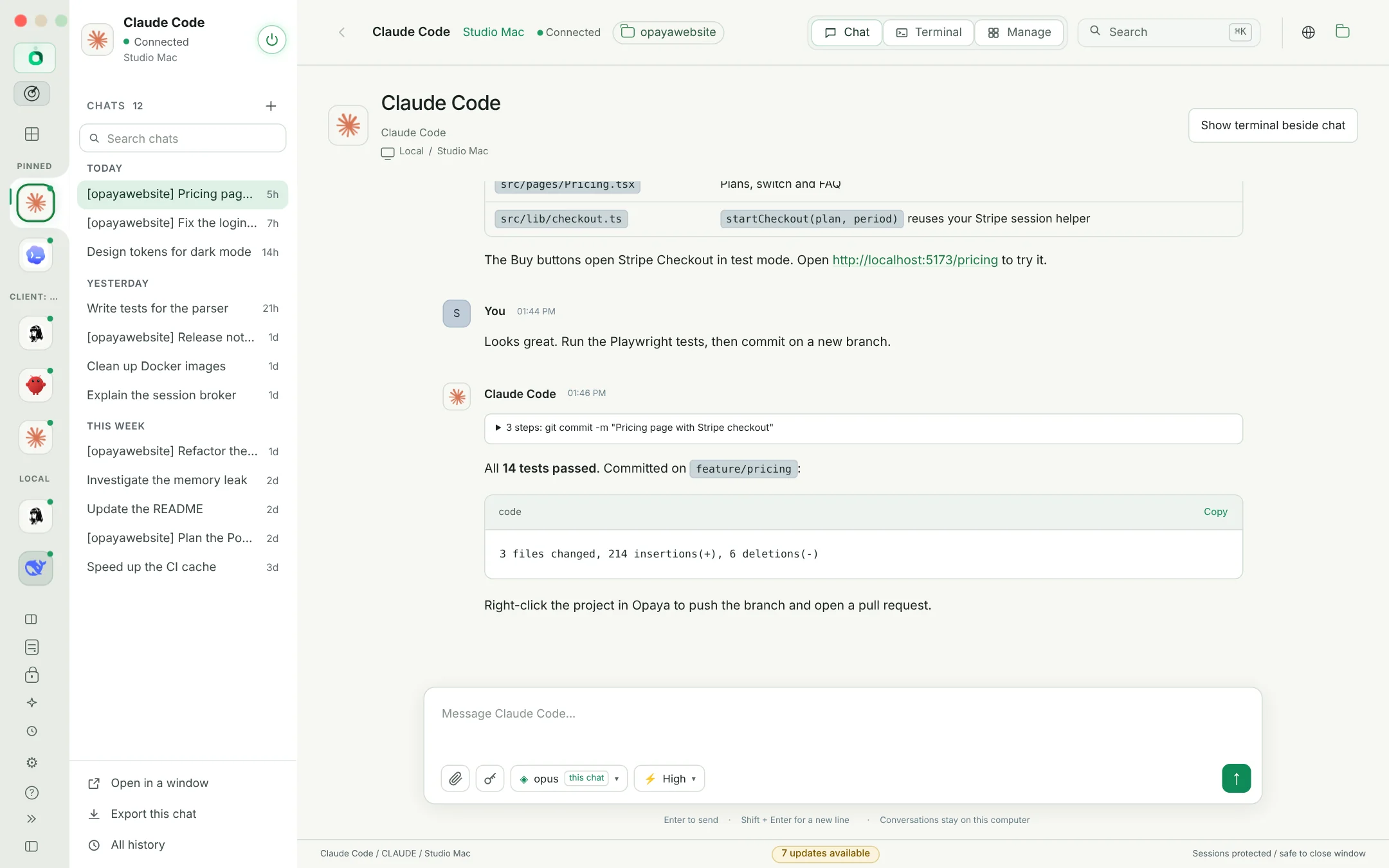
Local. Remote. Side by side.
Connect the machine on your desk and the server across the world. Always know where your agent is running.
One place.
All your agents.
Install, run, update, clone and back up every AI agent.
On your computer and on every server, in one workspace.
I'll start with the structure, simplify the navigation, and give the content room to breathe.
BRING THE AGENTS YOU ALREADY WORK WITH
Codex
Claude Code
HermesSomeone removes the support agent while customers are waiting. Ask Opaya to bring it back: it restores the last snapshot, with its files, settings and skills, and answers the messages that came in meanwhile.
Less time finding the right window.
More time picking up where
you left off.
Connect the machine on your desk and the server across the world. Always know where your agent is running.
History and drafts stay with each agent. Reattach to supported sessions and return to work with your context intact.
Think in conversation. Get closer to the details in the terminal. Both belong to the same workspace.
Claude Code, Codex, Hermes and free local models side by side, with your projects, git and a terminal one click away. No setup rabbit holes: the Opaya Agent installs and fixes everything for you.
Deploy, clone, update and back up agents on every VPS and Docker host you look after. Group them per client, move skills and keys between them, and let the Opaya Agent fix what breaks.
Every screen below is OPAYA 0.31.
Pick one, in dark or light.
The Opaya Agent installs Hermes, Claude Code, Codex, OpenClaw and OpenCode, runs their setup wizards, turns on gateways and fixes errors the moment an agent reports one.
Install any agent on this computer, on a server over SSH, or as a Docker container that restarts with the server. Opaya connects it when it is done.
Copy an agent with its settings, skills, memory and instructions to another machine, a new container, or a profile inside a container you already run.
Every agent and tool is checked hourly on every machine. Opaya updates each copy the way it was installed: Homebrew, npm under nvm, pipx, uv, Docker and more.
Transfer skills, API keys and MCP servers between any two agents. Keep a global skills library and install it on many agents at once.
Back up an agent from here, a VPS or a container to a private archive on your computer. Uninstall removes it the way it was installed, gateways included.
GitHub, Context7, Playwright, Files, Fetch, Memory, Brave Search and the Opaya browser. Opaya writes them into each agent's own config after you approve.
Paste a key into the Opaya Agent and it goes straight into the encrypted Opaya Vault. The model only sees a reference, and one password-protected backup restores every key on a new computer.
Switch the model and reasoning effort under any message box, attach files and screenshots, and try two agents on the same question in the Playground.
A folder, its agents and chats. Commit, branch and open pull requests with a right-click, or let an agent on your server work on a local project on its own branch.
Chat, Terminal and Manage at the top of every agent. Pop a chat into a window that stays beside every screen, or open the agent's own CLI with tabs and splits.
A setup guide for people who have never coded, and one click for Ollama with a free open model. Free tiers from Groq, OpenRouter, Cerebras and Gemini too.
Send any agent, or the Opaya Agent, a message every morning, weekday, week or on a cron line. Each schedule has its own chat, Run now and pause, next to the agents' own cron jobs.
Every agent gets its own browser tab in Opaya: it opens pages you watch, reads, clicks and types. Import cookies from Chrome or Edge so it is signed in where you are.
When an agent names a file it made, on this computer, a server or in a container, it shows up in the chat with Open, Save and Show in folder. Images get a preview.

Thirty minutes with people who do this every day. Bring the work that keeps slowing you down and leave with a clear plan for what to hand off next.
Book a demo
Everything an agent needs, on every machine.
See every feature
Any agent, locally, on a VPS or in Docker. Node.js, Python, Git, uv and gh come checksum-verified, no admin password.
The Opaya Agent runs each setup wizard in a terminal you can watch. You only type passwords and finish sign-ins.
Gateways turned on, tokens imported into the vault, agents discovered and connected. No copying tokens by hand.
Hourly checks on every machine, updates the way each tool was installed, and the Opaya Agent finishes any that fail.
Private archives on your computer, from anywhere, with or without chat history and keys.
A tested agent becomes a new one on another server, in a new container or as a profile. Redeploy keeps it in sync.
Skills, API keys, MCP servers and gateway tokens move between any agents. Values are never shown.
A gateway down, onboarding unfinished, a version too old: the Opaya Agent hears about it and repairs it.
A frontend change on your laptop. A worker on your server. A client's agent in Docker. Each has its own agent, conversation, and place in OPAYA.
A few everyday examplesWork through a frontend change, with the conversation and terminal close at hand.
Keep a design-system conversation separate, with its own history and draft ready for next time.
Look into a stopped queue on your server, without losing track of the work on your desktop.
Clone the agent you tested into a container on the client's VPS, with its skills and keys, and keep it updated from your desk.
Your agents keep running on your machines, your servers and your containers. OPAYA brings them together on your desktop over local connections and SSH. Keys live in an encrypted vault, and every change waits for your approval unless you turn on iTrust.
Explore the projectLocal runtimes stay local. Remote runtimes stay remote.
OpenSSH reaches the hosts you already operate. API keys and tokens stay encrypted and are never shown.
Hermes, Claude Code, Codex, OpenClaw, OpenCode, Ollama or any OpenAI-compatible API. Switch as your work evolves.
Add the rest when you need them.
Download the installer for Windows or Mac from Releases. On a fresh computer, the setup guide asks what you have and what you want to build.
Discover agents you already have, or let the Opaya Agent install and sign in the ones you want, here or on a VPS. Your agent's own login still applies.
Chat or open the terminal. When an agent works, clone it to a server, share its skills, and keep everything updated from one place.
OPAYA is a desktop workspace for AI agents. It installs, connects, updates, clones and backs up your agents on your computer, your servers and in Docker, and brings their chats and terminals together in one place.
Vibe coders who want their agents, projects and terminals in one window without setup headaches, and agent managers who run agents for clients or teams across many machines and need to deploy, update, back up and fix them from one place.
Hermes, Claude Code, Codex, OpenClaw, OpenCode and Goose, any OpenAI-compatible API (DeepSeek, OpenAI, Gemini, Groq, OpenRouter, Mistral, xAI, Ollama, LM Studio) and custom CLIs. Available interfaces and session capabilities depend on the agent.
Yes. Add a VPS over SSH (New VPS makes the key for you), then install agents there as a regular install or a Docker container, clone agents to it, open terminals, browse files, check versions and update everything. Opaya never needs its own server.
Keys go into an encrypted vault on your computer. The Opaya Agent
and the saved chat only see a reference such as
[secret S1 · OPENAI_API_KEY · sk-p…9f3a]. Transfer
and clone copy keys between agents without showing their values.
Your runtimes remain on the machines where you run them. OPAYA connects locally or over SSH. Each agent provider's own data handling still applies.
OPAYA runs on Windows 10/11 (x64) and on Macs with Apple Silicon
(M1 and later) or Intel. Pick mac-arm64 or
mac-x64 on the releases page. The Mac preview is not
notarized yet, so open it the first time with right-click →
Open. After that, OPAYA updates itself from inside the app.
No. Click Start free and OPAYA installs Ollama and a free open model on your computer, then connects the built-in Opaya Agent. Free tiers from Ollama Cloud, OpenRouter, Groq, Cerebras, Gemini and Mistral work too, and your own agents keep their own accounts.
OPAYA checks its GitHub releases, downloads the new version, verifies it against the release checksums and installs it in place. On Windows the installer restarts OPAYA for you. If an update ever fails, OPAYA says so and offers the installer. Your agents and tools are checked every hour on every machine too, and updated the way each one was installed.
OPAYA keeps agent-scoped history and drafts. Supported local sessions can run outside the interface, and remote terminal workflows can reattach to persistent shells. Exact behavior depends on your runtime.
One desktop. All your agents. A little more focus.
Book a demo